Business Calendar 2 Planner

Business Calendar 2 Planner

  • DeveloperAppgenix Software
  • GenreProductivity
  • Installs10,000,000+
  • UpdatedFeb 28, 2026
  • VersionVaries with device
  • RequirementsAndroid
  • ReleasedDec 19, 2014
  • ContentEveryone
Open official listingAPK metadata only
Business Calendar 2 Planner screenshot 1Business Calendar 2 Planner screenshot 2Business Calendar 2 Planner screenshot 3Business Calendar 2 Planner screenshot 4Business Calendar 2 Planner screenshot 5Business Calendar 2 Planner screenshot 6

Business Calendar 2 Planner

Editorial review: Business Calendar 2 Planner APK and install guide

A useful APK page for Business Calendar 2 Planner has to do more than repeat a store description. It should explain what kind of user the productivity listing is for, where the APK source points, what fields are missing, and which signals deserve a second look. This profile starts with com.appgenix.bizcal, Appgenix Software, version Varies with device, Not published by official listing, and Check official listing before install, then adds install-readiness notes around those facts.

The official short summary says: "Your daily calendar planner for work, family & private events". opskd treats that as a claim to verify, not as a complete review, because store copy often emphasizes features while leaving permissions, account requirements, monetization, and source status for the user to check separately.

10,000,000+ installs indicates broad adoption, so comparison should focus on whether the current version still matches the reputation built by earlier releases. 4.5 out of 5 across 270,628 ratings is a strong popularity signal, but it should still be read beside update freshness, privacy posture, and the exact developer name. High ratings can indicate satisfaction, yet they do not prove that permissions, pricing, or account requirements fit your use case.

The listing has been updated within the past year, about 96 days ago. That is acceptable for many categories, but the official listing should still be checked for compatibility notes and recent user feedback.

Who this APK listing is for

Business Calendar 2 Planner is most relevant for people who use Android for documents, planning, notes, work communication, scanning, or repeatable daily workflows. A good fit means the app's stated purpose, screenshots, rating pattern, developer identity, and official source all support the same story. If you only need a quick category browse, compare it with nearby productivity alternatives; if you are close to installing, slow down and check the APK identity rows first.

  • Best fit: people who use Android for documents, planning, notes, work communication, scanning, or repeatable daily workflows.
  • Review focus: reliability, account dependency, export options, sync behavior, offline mode, privacy controls, and how easy it is to leave the app later.
  • Current public signal: 10,000,000+ installs and 4.5 out of 5 rating data.

APK source and identity

This page exposes APK metadata for the listing but does not claim to host a standalone APK package. That distinction is intentional. Use the package name, version, file size field, Android requirement, and official listing link as comparison points when you verify the app outside opskd.

  • Package: com.appgenix.bizcal.
  • Version shown: Varies with device.
  • Source status: APK metadata only.
  • Integrity status: No standalone APK hash is published for this listing yet.

Listing quality signals

The useful signals for Business Calendar 2 Planner are not only the headline score. opskd reads the listing through category fit, developer transparency, version clarity, source status, screenshot availability, privacy policy access, and whether the official description makes specific claims that can be checked. For productivity, the most important review focus is reliability, account dependency, export options, sync behavior, offline mode, privacy controls, and how easy it is to leave the app later.

  • Ads or ad-like wording appear in the listing, so review whether placement interrupts active tasks or gameplay.
  • Paid features, subscriptions, trials, or in-app purchases may affect the real cost of using the app.
  • Account, login, sync, or cloud language suggests you should check data retention and export options.
  • Family or learning language makes age fit, privacy policy clarity, and parent controls especially important.
  • Online, social, or leaderboard features can add account, moderation, and notification considerations.

Trust checks before install

For productivity apps, permissions can matter as much as the feature list. verify file access permissions, cloud sync settings, subscription terms, background activity, and whether the app works without an account. A privacy policy is especially important when the app handles documents, children's activity, learning progress, files, cloud sync, user accounts, location, chat, or social features. If a permission does not fit the app's purpose, treat that as a reason to slow down and verify the developer's explanation.

  • Developer website — Check ownership, support channels, and product documentation from Appgenix Software.
  • Privacy policy — Review what data may be collected, shared, or retained.
  • Official listing — Confirm the current version, rating, screenshots, and install availability.

Decision checklist

Use this checklist before acting on Business Calendar 2 Planner. It is designed for quick comparison across all APK listings on opskd, so every app keeps the same core fields visible while the surrounding review notes adapt to category, rating, update freshness, and source status.

  • Confirm that com.appgenix.bizcal matches the official listing before trusting any install path.
  • Compare version Varies with device, file size Not published by official listing, and Android requirement: Check official listing before install.
  • Review Appgenix Software's privacy policy and support links, especially if the app asks for accounts, files, location, camera, microphone, contacts, or cloud sync.
  • Treat 4.5 out of 5 and 10,000,000+ installs as discovery signals, not proof that the app is safe or right for your device.

Bottom line: Business Calendar 2 Planner is worth considering only if its package name, developer, source status, version, Android requirement, privacy policy, and permission profile all make sense for your use case. opskd keeps every APK listing exposed while adding this review layer so the page offers more than copied store text and gives you a clearer path before installing.

Official listing description

This is the official app listing description provided for reference. It does not mean opskd hosts a direct APK file for this app.

Business Calendar 2 has everything you need in a calendar app: It provides an excellent overview of your appointments, it’s easy to use and it gives you powerful tools for planning your events and tasks.

🎯 Calendar Planner and Task Organizer
▪ manage your appointments and tasks with just one app
▪ focus on work, family or private events by quickly hiding the other ones
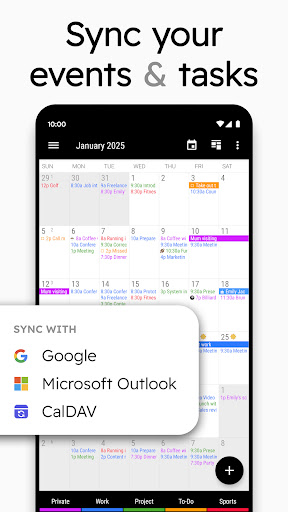
▪ sync with Google Calendar, Outlook Calendar, Exchange, CalDAV etc.
▪ use unique tools to swiftly update your work calendar as well as your private appointments
▪ share your schedule with colleagues, friends and family
▪ easily add birthdays and public holidays to your agenda

🚀 Your Quick Schedule Planner
▪ create events faster with smart suggestions for title, location and attendees
▪ add appointments to your schedule with only 2 taps by using templates
▪ simply speak your events details with our powerful voice input feature
▪ link contacts to your appointments
▪ attach files & photos
▪ add repeating events with flexible recurrence rules

🔧 Update Your Agenda Swiftly
▪ quickly move one or multiple appointments to another day or time
▪ postpone tasks with just one tap
▪ use drag & drop to move or copy events in our weekly planner
▪ copy an entry to multiple days at once, e.g. to place your work shifts in no time

💺 Work Calendar, Business Planner & Family Calendar
▪ get an excellent overview of your schedule in our monthly planner
▪ adjust weekly planner with simple swipe to show anything between 1 and 14 days
▪ find free time slots with heat map in yearly planner
▪ invite guests to your events and answer meeting invitations
▪ search your schedule in all views
▪ share your agenda easily

😃 Colorize Your Schedule
▪ categorize agenda items with individual colors
▪ enrich your schedule with more than 600 emoticons

🔔 Don’t Miss Anything
▪ get configurable notifications
▪ snooze reminders, show map, write email to attendees or check tasks directly from notification
▪ set repeating alarms and individual ringtones

🎨 Your Beautiful Calendar Widget
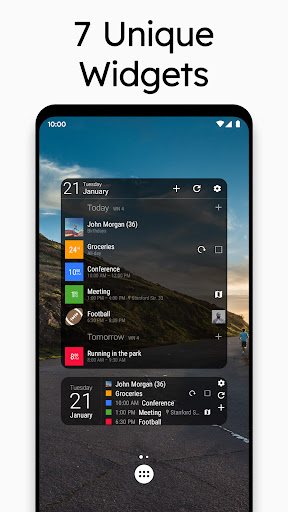
▪ choose one of 7 professional calendar widgets (month, week, day, agenda widget etc.)
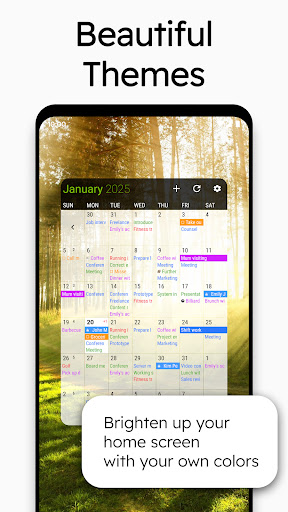
▪ select your preferred widget theme
▪ adapt each calendar widget to suit your personal needs

🌏 Synchronized or Local
▪ sync with Google Calendar using Android calendar synchronization
▪ connect your tasks with Google Tasks
▪ integrates with CalDAV, Outlook Calendar & Microsoft To Do
▪ or use the app as a fully local schedule planner

Wear OS app
▪ keep track of your events and tasks on your smartwatch (Wear OS 2.23+)
▪ includes watch app, tiles and complications for your watch face

🌟 More unique premium features
▪ see the weather report for the next 7 days in daily planner, monthly planner and agenda
▪ mark events as canceled and reschedule them later on in monthly planner
▪ use recurring tasks, subtasks and priorities
▪ choose between 22 beautiful themes for the app (e.g. dark theme)
▪ print your schedule to PDF
▪ set font sizes individually for different components of the app
▪ import and export calendar data (.ical, .ics)

Download Business Calendar 2 for free now and enjoy the great overview and the many powerful features that are already included in the free version of our schedule planner. Unlock all our unique pro features later on.

💖 Developed with Energy and Passion
Business Calendar is developed by a small, dedicated team in Berlin. We’re completely self-sustained and only funded by the revenue of our calendar app. By upgrading our schedule planner to the pro version you will not only get a lot of professional premium features but also greatly support the continuous development of the app.

😃 Follow us
Read our tip of the week on Facebook:
www.facebook.com/BusinessCalendar2

Twitter: twitter.com/BizCalPro
Application popularity
91%
  • 270,628 ratings
  • 12,074 reviews

APK details

Business Calendar 2 Planner APK identity, source status, and install checks.

Open official listing
  • Package namecom.appgenix.bizcal
  • VersionVaries with device
  • File sizeNot published by official listing
  • Android requirementCheck official listing before install
  • APK sourceOfficial Google Play listing only
  • Integrity checkNo standalone APK hash is published for this listing yet
  • Safety noteInstall only after checking the official listing and requested permissions.
APK source checkopskd does not host a direct APK for this listing yet. We show the package name, version, file size, Android requirement, and official listing so you can verify the app before leaving the page.

App Information

  • DeveloperAppgenix Software
  • CategoryProductivity
  • VersionVaries with device
  • Installs10,000,000+
  • UpdatedFeb 28, 2026
  • ReleasedDec 19, 2014
  • Content ratingEveryone
  • Android versionAndroid
  • SizeUnknown

Similar Apps

Recommended Apps