Hivenet-Photo Backup & Storage

- DeveloperHive Computing Services SA
- GenreProductivity
- Installs1,000,000+
- UpdatedFeb 18, 2026
- Version1.45.0
- RequirementsAndroid
- ReleasedMay 16, 2023
- ContentEveryone
Open official listingAPK metadata only


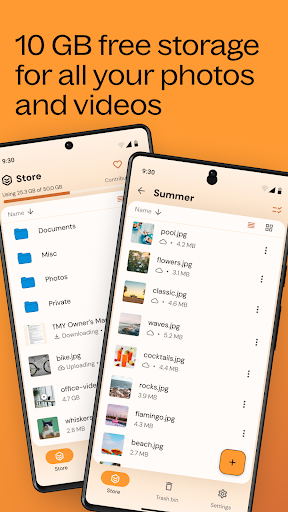



A useful APK page for Hivenet-Photo Backup & Storage has to do more than repeat a store description. It should explain what kind of user the productivity listing is for, where the APK source points, what fields are missing, and which signals deserve a second look. This profile starts with com.hivenet.android.hivedisk, Hive Computing Services SA, version 1.45.0, Not published by official listing, and Check official listing before install, then adds install-readiness notes around those facts.
The official short summary says: "sSecure, affordable and eco-friendly cloud backup for photos, videos, and files.". opskd treats that as a claim to verify, not as a complete review, because store copy often emphasizes features while leaving permissions, account requirements, monetization, and source status for the user to check separately.
1,000,000+ installs gives enough public footprint to compare the app with alternatives, while still leaving room for careful review of support links and update cadence. 4.0 out of 5 across 2,292 ratings suggests a generally positive reception. For this score band, the useful question is whether the app's strengths match your needs and whether recent updates or user expectations have changed since the rating base was built.
The listing has been updated within the past year, about 151 days ago. That is acceptable for many categories, but the official listing should still be checked for compatibility notes and recent user feedback.
Hivenet-Photo Backup & Storage is most relevant for people who use Android for documents, planning, notes, work communication, scanning, or repeatable daily workflows. A good fit means the app's stated purpose, screenshots, rating pattern, developer identity, and official source all support the same story. If you only need a quick category browse, compare it with nearby productivity alternatives; if you are close to installing, slow down and check the APK identity rows first.
This page exposes APK metadata for the listing but does not claim to host a standalone APK package. That distinction is intentional. Use the package name, version, file size field, Android requirement, and official listing link as comparison points when you verify the app outside opskd.
The useful signals for Hivenet-Photo Backup & Storage are not only the headline score. opskd reads the listing through category fit, developer transparency, version clarity, source status, screenshot availability, privacy policy access, and whether the official description makes specific claims that can be checked. For productivity, the most important review focus is reliability, account dependency, export options, sync behavior, offline mode, privacy controls, and how easy it is to leave the app later.
For productivity apps, permissions can matter as much as the feature list. verify file access permissions, cloud sync settings, subscription terms, background activity, and whether the app works without an account. A privacy policy is especially important when the app handles documents, children's activity, learning progress, files, cloud sync, user accounts, location, chat, or social features. If a permission does not fit the app's purpose, treat that as a reason to slow down and verify the developer's explanation.
Use this checklist before acting on Hivenet-Photo Backup & Storage. It is designed for quick comparison across all APK listings on opskd, so every app keeps the same core fields visible while the surrounding review notes adapt to category, rating, update freshness, and source status.
Bottom line: Hivenet-Photo Backup & Storage is worth considering only if its package name, developer, source status, version, Android requirement, privacy policy, and permission profile all make sense for your use case. opskd keeps every APK listing exposed while adding this review layer so the page offers more than copied store text and gives you a clearer path before installing.
This is the official app listing description provided for reference. It does not mean opskd hosts a direct APK file for this app.
Hivenet-Photo Backup & Storage APK identity, source status, and install checks.