Super Backup & Restore

Super Backup & Restore

  • DeveloperMobileIdea Studio
  • GenreTools
  • Installs10,000,000+
  • UpdatedSep 18, 2025
  • Version2.4.06
  • RequirementsAndroid
  • ReleasedSep 14, 2011
  • ContentEveryone
Open official listingAPK metadata only
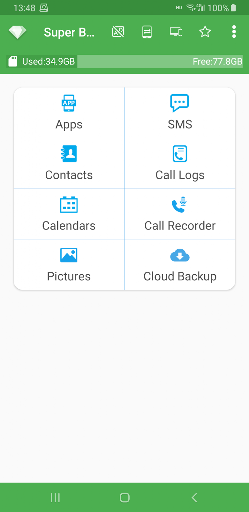
Super Backup & Restore screenshot 1Super Backup & Restore screenshot 2Super Backup & Restore screenshot 3Super Backup & Restore screenshot 4Super Backup & Restore screenshot 5Super Backup & Restore screenshot 6

Super Backup & Restore

Editorial review: Super Backup & Restore APK and install guide

A useful APK page for Super Backup & Restore has to do more than repeat a store description. It should explain what kind of user the tools listing is for, where the APK source points, what fields are missing, and which signals deserve a second look. This profile starts with com.idea.backup.smscontacts, MobileIdea Studio, version 2.4.06, Not published by official listing, and Check official listing before install, then adds install-readiness notes around those facts.

The official short summary says: "The fastest data backup & restore tool on android! (Apps/Contacts/SMS/Call logs)". opskd treats that as a claim to verify, not as a complete review, because store copy often emphasizes features while leaving permissions, account requirements, monetization, and source status for the user to check separately.

10,000,000+ installs indicates broad adoption, so comparison should focus on whether the current version still matches the reputation built by earlier releases. 3.9 out of 5 across 181,447 ratings is a mixed signal. That does not automatically make the listing unsafe, but it does mean the APK identity, support links, screenshots, and privacy details deserve extra attention before you rely on the app.

The listing has been updated within the past year, about 258 days ago. That is acceptable for many categories, but the official listing should still be checked for compatibility notes and recent user feedback.

Who this APK listing is for

Super Backup & Restore is most relevant for Android users who need practical utilities for files, connectivity, device checks, calculators, conversion, or everyday maintenance. A good fit means the app's stated purpose, screenshots, rating pattern, developer identity, and official source all support the same story. If you only need a quick category browse, compare it with nearby tools alternatives; if you are close to installing, slow down and check the APK identity rows first.

  • Best fit: Android users who need practical utilities for files, connectivity, device checks, calculators, conversion, or everyday maintenance.
  • Review focus: permission scope, offline usefulness, interface clarity, export safety, ad placement, and whether the tool does one job cleanly.
  • Current public signal: 10,000,000+ installs and 3.9 out of 5 rating data.

APK source and identity

This page exposes APK metadata for the listing but does not claim to host a standalone APK package. That distinction is intentional. Use the package name, version, file size field, Android requirement, and official listing link as comparison points when you verify the app outside opskd.

  • Package: com.idea.backup.smscontacts.
  • Version shown: 2.4.06.
  • Source status: APK metadata only.
  • Integrity status: No standalone APK hash is published for this listing yet.

Listing quality signals

The useful signals for Super Backup & Restore are not only the headline score. opskd reads the listing through category fit, developer transparency, version clarity, source status, screenshot availability, privacy policy access, and whether the official description makes specific claims that can be checked. For tools, the most important review focus is permission scope, offline usefulness, interface clarity, export safety, ad placement, and whether the tool does one job cleanly.

  • Ads or ad-like wording appear in the listing, so review whether placement interrupts active tasks or gameplay.
  • Online, social, or leaderboard features can add account, moderation, and notification considerations.
  • Device data or file-related language means permissions should be compared with the app purpose before install.

Trust checks before install

For tools tools, permissions can matter as much as the feature list. inspect requested permissions, developer reputation, privacy policy, whether files leave the device, and how results can be exported. A privacy policy is especially important when the app handles documents, children's activity, learning progress, files, cloud sync, user accounts, location, chat, or social features. If a permission does not fit the app's purpose, treat that as a reason to slow down and verify the developer's explanation.

  • Developer website — Check ownership, support channels, and product documentation from MobileIdea Studio.
  • Privacy policy — Review what data may be collected, shared, or retained.
  • Official listing — Confirm the current version, rating, screenshots, and install availability.

Decision checklist

Use this checklist before acting on Super Backup & Restore. It is designed for quick comparison across all APK listings on opskd, so every app keeps the same core fields visible while the surrounding review notes adapt to category, rating, update freshness, and source status.

  • Confirm that com.idea.backup.smscontacts matches the official listing before trusting any install path.
  • Compare version 2.4.06, file size Not published by official listing, and Android requirement: Check official listing before install.
  • Review MobileIdea Studio's privacy policy and support links, especially if the app asks for accounts, files, location, camera, microphone, contacts, or cloud sync.
  • Treat 3.9 out of 5 and 10,000,000+ installs as discovery signals, not proof that the app is safe or right for your device.

Bottom line: Super Backup & Restore is worth considering only if its package name, developer, source status, version, Android requirement, privacy policy, and permission profile all make sense for your use case. opskd keeps every APK listing exposed while adding this review layer so the page offers more than copied store text and gives you a clearer path before installing.

Official listing description

This is the official app listing description provided for reference. It does not mean opskd hosts a direct APK file for this app.

The fastest data backup and restore tool on Android!
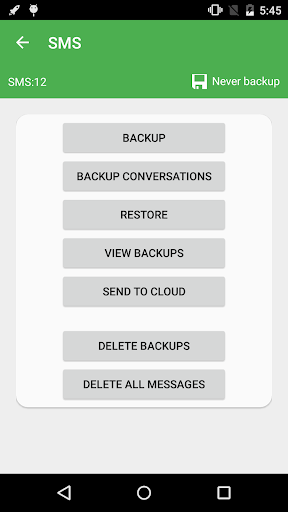
You can backup Apps, Contacts, SMS, Call Logs, Bookmarks, Calendars to your SD card.
You can share installation APK files to your friends.
You will never lose your data again!

★Important Notice #1
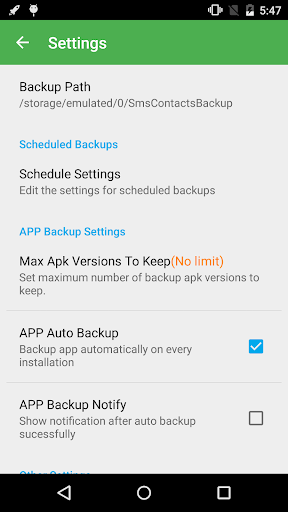
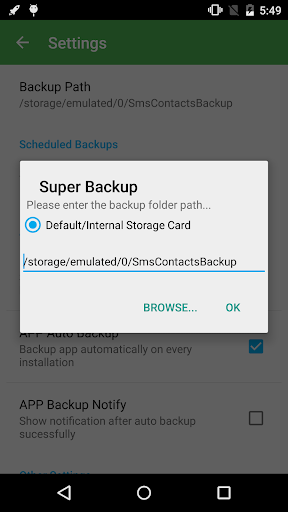
If you intend to do a factory reset on the phone, please make sure default backup folder is in your external SD card before doing it. If not, please copy the entire backup folder ("SmsContactsBackup" by default) to your external SD card

★Important Notice #2
Since Android M 6.0, access bookmarks from 3rd party application is disabled, so Super Backup cannot backup and restore bookmarks.

★Important Notice #3
If you schedule automatic backups, and you use some apps such as Task Killer or Memory Clear, please make sure you had add Super Backup into their White List or Ignore list. Otherwise Super Backup can not run in background, and automatic backups will not work.

★Important Notice #4
When you finished the SMS restore process, but the messages were not displayed in your default SMS app, please try to reboot your device.


Features:
- Backup apps to SD card
- Backup download links of your installed apps
- Backup Contacts & SMS & Call logs & Bookmarks & Calendars to SD card
- Restore Contacts & SMS & Call logs & Bookmarks & Calendars from SD card
- Can select SMS conversations to backup
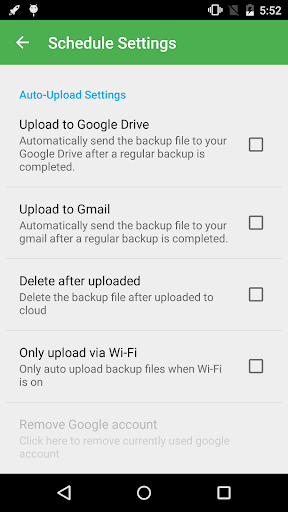
- Schedule automatic backups((★Not supported since Android 13 ★)
- Can change backup folder to external SD card
- Call Recorder: Support backup your voice call recording. It can perfectly record the phone call voices to mp3 files. Record both sides voice clearly! (★Not supported since Android 10 ★)


About Permissions:
READ YOUR TEXT MESSAGES (SMS OR MMS)/EDIT YOUR TEXT MESSAGES (SMS OR MMS)
These permissions are used to backup & restore your SMS

READ YOUR CONTACTS/MODIFY YOUR CONTACTS
These permissions are used to backup & restore your Contacts

WRITE WEB BOOKMARKS AND HISTORY/READ YOUR WEB BOOKMARKS AND HISTORY
These permissions are used to backup & restore your Bookmarks

READ CALENDAR EVENTS PLUS CONFIDENTIAL INFORMATION/ADD OR MODIFY CALENDAR EVENTS AND SEND EMAIL TO GUESTS WITHOUT OWNERS' KNOWLEDGE
These permissions are used to backup & restore your Calendars

READ CALL LOG/WRITE CALL LOG
These permissions are used to backup & restore your Call logs

RECORD_AUDIO
These permissions are used to recording your voice call

Location Permission
This permission is required to transfer backup files between devices by WiFi peer to peer.
Starting from Android 8, using the Wi-Fi peer-to-peer requires location permission. This is required by android system, we will never collect your location information.

Translations:
- Italian- Thanks to Emmanuel Avetta
- Portuguese - Thanks to Emmanuel Avetta
- Korean - Thanks to 장승훈
- Hungarian - Thanks to Balu & Hevesi J.
- Turkish - Thanks to Fatih Fırıncı
- Arabic - Thanks to Falcon Eye
- Polish - Thanks to Alvin Świtała
- Russian - Thanks to Сергей Приклонский, Mikhail Medvedev
- Ukrainian - Thanks to Mikhail Medvedev
- Czech - Thanks to Renek
Application popularity
79%
  • 181,447 ratings
  • 7,691 reviews

APK details

Super Backup & Restore APK identity, source status, and install checks.

Open official listing
  • Package namecom.idea.backup.smscontacts
  • Version2.4.06
  • File sizeNot published by official listing
  • Android requirementCheck official listing before install
  • APK sourceOfficial Google Play listing only
  • Integrity checkNo standalone APK hash is published for this listing yet
  • Safety noteInstall only after checking the official listing and requested permissions.
APK source checkopskd does not host a direct APK for this listing yet. We show the package name, version, file size, Android requirement, and official listing so you can verify the app before leaving the page.

App Information

  • DeveloperMobileIdea Studio
  • CategoryTools
  • Version2.4.06
  • Installs10,000,000+
  • UpdatedSep 18, 2025
  • ReleasedSep 14, 2011
  • Content ratingEveryone
  • Android versionAndroid
  • SizeUnknown

Similar Apps

Recommended Apps