10BA Pro Financial Calculator

10BA Pro Financial Calculator
  • DeveloperSegitiga.Pro
  • GenreProductivity
  • Installs100,000+
  • UpdatedOct 7, 2017
  • Version1.1g
  • RequirementsAndroid
  • ReleasedOct 8, 2017
  • ContentEveryone
Open official listingAPK metadata only
10BA Pro Financial Calculator screenshot 110BA Pro Financial Calculator screenshot 210BA Pro Financial Calculator screenshot 310BA Pro Financial Calculator screenshot 410BA Pro Financial Calculator screenshot 510BA Pro Financial Calculator screenshot 6

10BA Pro Financial Calculator

Editorial review: 10BA Pro Financial Calculator APK and install guide

10BA Pro Financial Calculator needs a closer APK review because productivity listings can look trustworthy from ratings alone while still leaving source, version, Android requirement, and privacy questions unanswered. This page keeps those checks in one place: package com.segitiga.fc10bapro, developer Segitiga.Pro, version 1.1g, file size Not published by official listing, and Check official listing before install. The goal is to help you decide whether the official listing deserves your trust before you leave opskd.

The official short summary says: "Like the industry standard financial calculator, but with TONS of extra features". opskd treats that as a claim to verify, not as a complete review, because store copy often emphasizes features while leaving permissions, account requirements, monetization, and source status for the user to check separately.

100,000+ installs gives enough public footprint to compare the app with alternatives, while still leaving room for careful review of support links and update cadence. 4.7 out of 5 across 1,746 ratings is a strong popularity signal, but it should still be read beside update freshness, privacy posture, and the exact developer name. High ratings can indicate satisfaction, yet they do not prove that permissions, pricing, or account requirements fit your use case.

The update signal is older than a year, about 3161 days ago. Treat that as a reason to verify Android compatibility, developer support, and whether the app still works as described.

Who this APK listing is for

10BA Pro Financial Calculator is most relevant for people who use Android for documents, planning, notes, work communication, scanning, or repeatable daily workflows. A good fit means the app's stated purpose, screenshots, rating pattern, developer identity, and official source all support the same story. If you only need a quick category browse, compare it with nearby productivity alternatives; if you are close to installing, slow down and check the APK identity rows first.

  • Best fit: people who use Android for documents, planning, notes, work communication, scanning, or repeatable daily workflows.
  • Review focus: reliability, account dependency, export options, sync behavior, offline mode, privacy controls, and how easy it is to leave the app later.
  • Current public signal: 100,000+ installs and 4.7 out of 5 rating data.

APK source and identity

This page exposes APK metadata for the listing but does not claim to host a standalone APK package. That distinction is intentional. Use the package name, version, file size field, Android requirement, and official listing link as comparison points when you verify the app outside opskd.

  • Package: com.segitiga.fc10bapro.
  • Version shown: 1.1g.
  • Source status: APK metadata only.
  • Integrity status: No standalone APK hash is published for this listing yet.

Listing quality signals

The useful signals for 10BA Pro Financial Calculator are not only the headline score. opskd reads the listing through category fit, developer transparency, version clarity, source status, screenshot availability, privacy policy access, and whether the official description makes specific claims that can be checked. For productivity, the most important review focus is reliability, account dependency, export options, sync behavior, offline mode, privacy controls, and how easy it is to leave the app later.

  • Ads or ad-like wording appear in the listing, so review whether placement interrupts active tasks or gameplay.
  • Family or learning language makes age fit, privacy policy clarity, and parent controls especially important.
  • Device data or file-related language means permissions should be compared with the app purpose before install.

Trust checks before install

For productivity apps, permissions can matter as much as the feature list. verify file access permissions, cloud sync settings, subscription terms, background activity, and whether the app works without an account. A privacy policy is especially important when the app handles documents, children's activity, learning progress, files, cloud sync, user accounts, location, chat, or social features. If a permission does not fit the app's purpose, treat that as a reason to slow down and verify the developer's explanation.

  • Developer website — Check ownership, support channels, and product documentation from Segitiga.Pro.
  • Privacy policy — Review what data may be collected, shared, or retained.
  • Official listing — Confirm the current version, rating, screenshots, and install availability.

Decision checklist

Use this checklist before acting on 10BA Pro Financial Calculator. It is designed for quick comparison across all APK listings on opskd, so every app keeps the same core fields visible while the surrounding review notes adapt to category, rating, update freshness, and source status.

  • Confirm that com.segitiga.fc10bapro matches the official listing before trusting any install path.
  • Compare version 1.1g, file size Not published by official listing, and Android requirement: Check official listing before install.
  • Review Segitiga.Pro's privacy policy and support links, especially if the app asks for accounts, files, location, camera, microphone, contacts, or cloud sync.
  • Treat 4.7 out of 5 and 100,000+ installs as discovery signals, not proof that the app is safe or right for your device.

Bottom line: 10BA Pro Financial Calculator is worth considering only if its package name, developer, source status, version, Android requirement, privacy policy, and permission profile all make sense for your use case. opskd keeps every APK listing exposed while adding this review layer so the page offers more than copied store text and gives you a clearer path before installing.

Official listing description

This is the official app listing description provided for reference. It does not mean opskd hosts a direct APK file for this app.

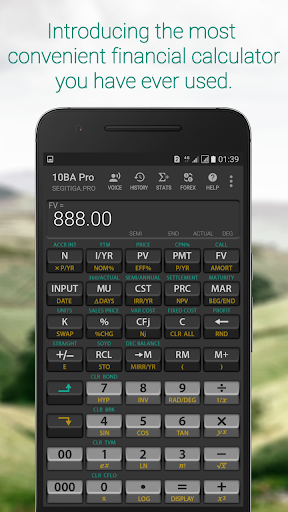
The 10BA Financial Calculator works like the industry standard financial calculator such as the HP 10B, HP 10BII, or the HP 10BII+ emulator; however, we add tons of unique features that makes this app be the most convenient financial calculator that you have ever used.

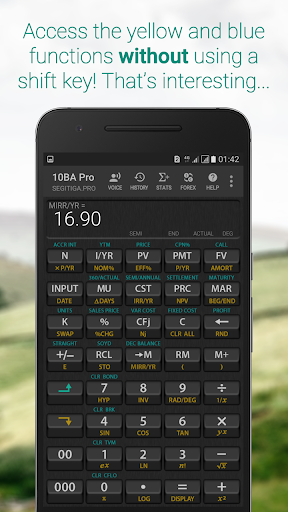
Single-Access Key
No need to use a shift key to access the yellow or the blue functions. The Single-Access Key feature enables you to activate the yellow and the blue functions quickly and conveniently.

Integrated Cheatsheet
No need to memorize anything. Each functions on the calculator has a cheatsheet containing brief description of how the function works, and examples.

Anti-Boring
Replace the background with an image from your photo gallery. You can even make it transparent like the interface you often see on TV, kind of.

Zero-Learning Curve
Already familiar with the 10BII+ or similar financial calculator? Practically there is no learning curve with the 10BA Pro. We add features that makes it even easier to use than the real thing.

Peace of Mind
The 10BA Pro has hundreds of functions. Many of them you'll probably never use. But you know they are there in case you need them.

Integrated Currency Converter
Currency converter is integrated into the calculator and is only a keystroke away.

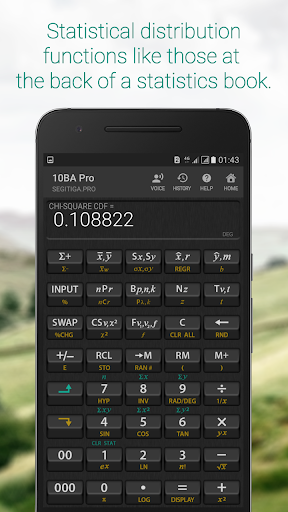
Statistical Distribution Functions
A separate screen for Statistics so many functions can be accomodated. Calculate most distribution functions that you find at the back of a statistics book!

Amortization Schedule
Produce an amortization schedule that you can convert into Excel format and later share with your contacts.

Financial Functions
• TVM: Number of periods, Interest/year, Present value, Periodic payment, Future value, Amortization, Amortization schedule
• Business percentages: Percent, Percent change, Markup, Cost, Price, Margin
• Cashflow analysis: IRR, MIRR, Net present value, Net future value
• Depreciation: Straight line, Sum of the years’ digits, Declining balance
• Interest conversion: Nominal, Effective
• Break even analysis: Units, Sales price, Variable cost, Fixed cost, Profit
• Bonds: Accrued interest, YTM, Price, Coupon, Call, 360/Actual, Semiannual/Annual
• Calendar functions: Date, Date difference, 360/Actual

Statistical Functions
• Summary statistics
• Regressions: Linear, Exponential, Logarithmic, Power, Exponent, Inverse
• X-Estimates, Y-Estimates, Correlation
• Standard deviation: Sample, Population
• Average, Weighted average
• Permutation, Combination
• Distribution: Binomial, Poisson, Normal, Inverse Normal, Student-t, Inverse Student-t, Chi-Square, Inverse Chi-Square, F, Inverse F
• Pseudo random number

Mathematical functions
• Basic arithmetic
• Trigonometric, Inverse trigonometric
• Hyperbolic, Inverse Hyperbolic

For TI Users, before you post a one-star review asking where the CPT button is.
There is no [CPT] button by design so don't look for it. The app does not need the [CPT] key. To find future value [FV] instead of [CPT][FV] just tap [FV]. Read the integrated Help feature for details, or simply contact us!

Feedback and Contact Info
Please contact us for feedback, suggestions for improvement, or bugs at [email protected]

Privacy Policy
10BA Pro Financial Calculator does not collect, store, or transmit information about its users. The use of "allow to take pictures and record video" permission is for the application to use the back camera and achieve transparent background effect. The use of "allow to access photos, media, and files on your device" permission is to enable you to select an image from the gallery folder as calculator background. The permission is also necessary if you want to convert the amortization schedule into Excel format because the app needs to save the converted file into the Documents folder.
Application popularity
93%
  • 1,746 ratings
  • 221 reviews

APK details

10BA Pro Financial Calculator APK identity, source status, and install checks.

Open official listing
  • Package namecom.segitiga.fc10bapro
  • Version1.1g
  • File sizeNot published by official listing
  • Android requirementCheck official listing before install
  • APK sourceOfficial Google Play listing only
  • Integrity checkNo standalone APK hash is published for this listing yet
  • Safety noteInstall only after checking the official listing and requested permissions.

APK source checkopskd does not host a direct APK for this listing yet. We show the package name, version, file size, Android requirement, and official listing so you can verify the app before leaving the page.

App Information

  • DeveloperSegitiga.Pro
  • CategoryProductivity
  • Version1.1g
  • Installs100,000+
  • UpdatedOct 7, 2017
  • ReleasedOct 8, 2017
  • Content ratingEveryone
  • Android versionAndroid
  • SizeUnknown

Similar Apps

Recommended Apps